Introduction
Once again, I sought a solution and found none. That does not mean there is none out there. It just means I did not find it in the short search I performed. In this case, that search was for a baby tracking app. No, not like an Air Tag1 I mean like a book where I can write down the feeds and naps my baby boy has had throughout the day.
My wife and I had a baby boy less than a year ago and it has been wonderful. It has also been challenging and there is so much to do and keep track of throughout the day. Between the first week of 12-16 feeds a day and needing to get his weight up while also dealing with little-to-no sleep of our own and trying to make sure he slept enough, we were losing our minds writing everything down on paper. It worked, but it was just numbers on a page that you had to go review and analyze yourself every time you wanted to compare today to yesterday or know how long he’s slept today.
There are apps out there that provide this, but they cost money or sell your info to advertisers and we do not like that around here. We believe in your freedom to choose maybe a harder path with less polished tools but ones that you know are free and not keeping track of you like a creep.
Enter the Baby Book2.
Baby Book is your companion for tracking your baby’s progress.
Goals
The Baby Book is designed to be a simple, self hostable Single Page Application3. I wanted this app to be easy to use and setup so that any of my friends could also use it when the time came.
Features:
- Feed tracking
- Nap tracking
- Milestone tracking
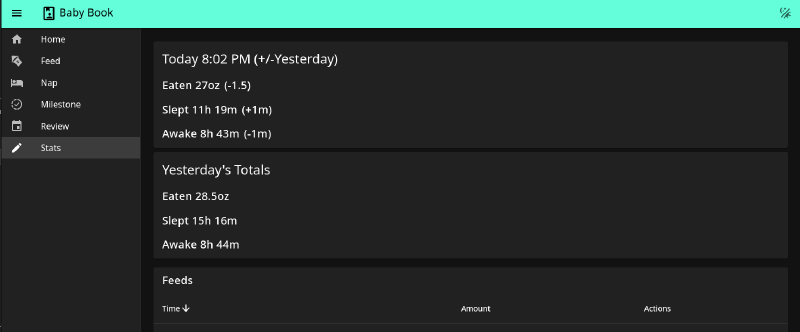
- Daily statistics
- Calendar view
I want to add more stats and analytics, along with some conveniences like “Awake since time”, that would let you know that your baby is awake and has been since a certain time. Perhaps one day I will make it into a full progressive web app that can be “installed” onto mobile devices and handle its own authentication.
Stack
VueJS, Fastify, Mirko-ORM, SQLite
Frontend
As per the usual around here, I used VueJS as the frontend framework. It’s fast, reliable, and lightweight. Approaching Vue seems a lot easier than the behemoths like React or Angular. It’s also familiar to me, because I have used it in the past both for work and personal projects.
Backend
Backend code was a hard choice. I went back and forth on the right framework and language to use. Java would have made the backend very rigid and clearly defined, but resource hungry. Straight ExpressJS would have left a lot to be desired for structure but very easy to add and update code in the future. Golang has been of particular interest to me as of late and you may see some more scripting type work from me done in Go.
In the end, I chose a TypeScript4 approach using Fastify5 as the web server portion and Mikro ORM6 as the SQLite interface.
Database
With that, yes the database is SQLite backed. Why? Because this is a lightweight, self-hostable app. PostgreSQL is heavy and, in my opinion, over-recommended for small projects. SQLite is capable of handling lots of transactions and serving up data to multiple clients (I mean user’s, not server clients).
NodeJS now supports SQLite directly, which was great for when I discovered some shortcomings of Mikro-orm’s translations. Could I have gone with just that and skipped out on the 300 or so dependencies Mikro-orm includes? Yes. Should I have? Maybe. Will I? Also maybe.
An Aside About ORMs
Object Relational Mappers are very powerful tools for constructing databases and queries in a structure and orderly way. The pattern for them often involves some translation layer between the Object notion of a given language and the database types of your given database.
They have their pros and cons like any other tool. For example, they often give you the flexibility to easily switch which database type you are backing with (i.e. from SQLite to PostgreSQL).
On the cons side, well Mikro-orm had some for sure. I ran into some weird path requirements that made working inside a container awkward. Once I made the container non-root and relatively immutable, it stopped working altogether. It defaults to using some TypeScript files in a specific directory to read metadata and then generates files at runtime to help manage them. Clearly a non-starter for immutable images.
So I pivoted off of the default to the less recommended reflection approach and modified all the path requirements to work within my container bounds.
I also discovered that because of how SQLite handles dates, my timestamps were being inserted as strings in a non-sortable format. This meant all of my sorting had to be done client-side and we could not get a subset of items in the table reliably. I had to write a manual migration, thanks Node for introducing SQLite support just in time for this, that converts the strings into numbers. This then allowed me to do formatting and sorting server side.
But all this said, I did not have to create custom query logic, entity mappings, relational mappings, and a variety of other pieces.
Closing
As always, I am working to make things available and accessible to people who have their own lives and want their own data to be their own. That means, Baby Book is free and open source software. You can check it out yourself at the GitLab link. I have a few more features in mind to add and I want to write up some basic documentation to include with the software so that it is easy to reach and understand.
To be completely clear, I use this tool. I made it for my own needs, but I hope it can service others. I did not make it without some idea of what a new parent actually needs, because I am a new parent, and yes it does get better in time!